
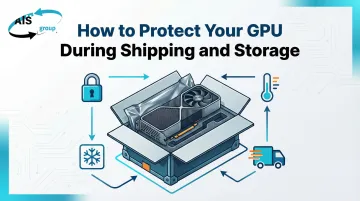
Introduction
In-transit damage to high-value electronics costs roughly $1 billion annually in the United States alone. For businesses shipping graphics processing units (GPUs), the stakes are high—a single NVIDIA RTX 4090 retails for $1,599, while an AMD RX 7900 XTX retails for $999.
GPUs combine several fragility factors that make them particularly vulnerable to packing oversights:
- Delicate PCB traces that crack under pressure or impact
- Sensitive memory chips susceptible to vibration damage
- ESD-vulnerable components that static discharge can destroy silently
- High replacement cost that makes any damage a significant financial loss
Modern GPUs are heavier and physically larger than ever before, with flagship cards weighing over 2 kg and occupying three expansion slots. This combination of mass, sensitivity, and value demands specialized protection protocols. This guide covers both short-term shipping protection and long-term storage safety, addressing shock, static, and moisture risks that can affect even carefully handled shipments.
Key Takeaways
- Use an anti-static shielding bag (metallic, not pink) as the first layer of protection
- Pack inside a double-walled corrugated box with 2 inches of cushioning on all sides
- Avoid regular plastic bags, loose foam peanuts, or oversized boxes — each leaves the GPU vulnerable to static, impact, or shifting
- Control temperature (50°F–77°F), humidity (20%–50%), and vibration during transit and storage
- Label packages as fragile and purchase shipping insurance for high-value GPUs
Why GPUs Need Special Protection
GPUs face three primary damage categories: electrostatic discharge (ESD), physical shock and vibration, and environmental exposure. Understanding each risk is the first step toward preventing it.
ESD Sensitivity
GPUs rank among the most ESD-sensitive components in a PC. According to ANSI/ESDA/JEDEC standards, some GPU components can be damaged at voltage levels below 125V (Charged Device Model)—far below the 3,000V threshold at which humans feel static discharge. Even a small, imperceptible static charge can degrade or destroy VRAM, the GPU die, or capacitors without leaving visible evidence. This damage can be latent, appearing weeks or months later as intermittent failures or performance degradation.
Physical Stress from Size and Weight
Modern flagship GPUs have grown substantially:
| GPU Model | Length | Weight | Slot Configuration |
|---|---|---|---|
| NVIDIA RTX 4090 Founders Edition | 304 mm (12") | 2.25 kg (5 lbs) | 3-slot |
| AMD RX 7900 XTX | 287 mm (11.3") | 1.81 kg (4 lbs) | 3-slot |
| ASUS TUF RX 7900 XTX | 353 mm (13.9") | 2.14 kg (4.7 lbs) | 4-slot |
These multi-kilogram cards exert significant force on packaging during drops or vibration. Improper packing creates stress points where the PCB can flex, sag, or experience impact resonance—cracking solder joints, damaging traces, and separating components from the board.
Environmental Threats
Temperature swings and humidity are slower threats, but no less damaging over time. Uncontrolled storage conditions can cause:
- Thermal stress from expansion and contraction of PCB layers and solder joints
- Moisture ingress that promotes ionic corrosion on exposed contacts
- Electrical shorts or open circuits from condensation in poorly sealed packaging
These risks compound quietly during long-term storage, making proper enclosure just as important as transit protection.
How to Pack a GPU for Shipping
Proper GPU packing follows a layered approach: ESD protection first, then physical cushioning, then structural containment. Skipping any layer increases risk significantly.
Anti-Static Protection: Your First Line of Defense
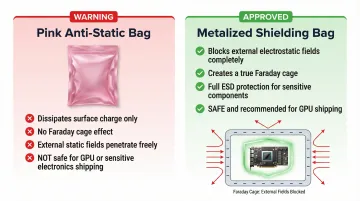
Use metalized shielding bags — not pink anti-static bags. Most people get this wrong:
- Pink anti-static bags contain a topical antistatic coating that dissipates charge from the bag's surface. They do NOT shield contents from external static fields and provide no Faraday cage protection
- Metalized shielding bags (silver/gray appearance) use a metalized polyester film that creates a Faraday cage, actively blocking external electrostatic fields from reaching the GPU
The Faraday cage principle is the only reliable protection against ESD damage during shipping. Place the GPU in a properly-sized metalized shielding bag and seal it completely before any other packing material contacts the card. Bubble wrap or foam directly on an unbagged GPU is not safe.
Cushioning and Internal Packing
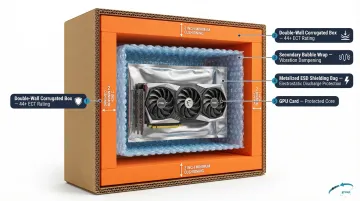
Minimum cushioning requirement: 2 inches on all sides. This is not a suggestion—it's the standard recommended by major carriers including UPS and FedEx.
Appropriate cushioning materials:
- High-density foam (preferred) — provides consistent shock absorption and doesn't settle during transit
- Bubble wrap (minimum 3/16" bubble size) — effective secondary cushioning when used in adequate thickness
- Foam-in-place solutions — custom-fit protection for high-value shipments
Why foam peanuts fail: Loose-fill peanuts shift and settle during transit, allowing heavy items like GPUs to migrate to the bottom or sides of the box where they absorb impact forces directly. Standard peanuts also generate static electricity. If you must use peanuts, use anti-static grade only — and only to fill voids after primary cushioning is in place.
For triple-slot cards, secure the GPU between two foam blocks or use custom-cut foam inserts. The card should not move at all when the sealed box is shaken.
Choosing the Right Box
The cushioning you've applied only works if the box around it holds its shape — which means box selection directly affects how well your internal packing performs.
Box size matters critically. An oversized box allows the GPU to shift and absorb impact forces directly; an undersized box crushes the cushioning and transfers shock to the card.
Use double-walled corrugated cardboard boxes for their superior crush resistance. Single-wall boxes lack the structural integrity needed for electronics weighing 2+ kg.
Edge Crush Test (ECT) ratings guide box strength:
| Weight Range | Recommended Wall Type | ECT Rating |
|---|---|---|
| Up to 30 lbs | Single Wall | 32 ECT |
| 31–50 lbs | Single Wall | 44 ECT |
| 51–80 lbs | Double Wall | 48 ECT |
| 81–100 lbs | Double Wall | 61 ECT |
While a single GPU weighs less than 30 lbs, the high value and fragility justify using a 44 ECT or double-wall box for maximum protection against crushing forces in automated sorting facilities.
Finding the exact dimensions you need matters. Alliance Packaging Group carries over 1,000 box sizes available for immediate shipment — ranging from 3"×3"×3" to 60"×32"×48" — so you can match the box precisely to your GPU plus the required 2 inches of cushioning on every side, without settling for whatever happens to be on a shelf nearby.
Sealing and labeling:
- Seal all seams with quality packing tape (2" width minimum)
- Label clearly: "Fragile — Electronics" and "This Side Up" on multiple faces
- Include internal documentation if shipping for repair or resale
How to Store a GPU Safely
Long-term storage introduces risks that shipping doesn't always present: sustained humidity exposure, dust accumulation, and temperature cycling that causes thermal expansion and contraction of solder joints and PCB layers.
Ideal Storage Conditions
Temperature and humidity ranges:
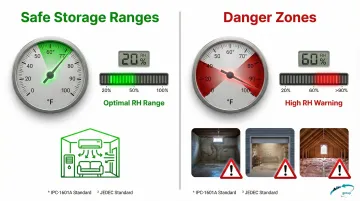
- Temperature: 50°F to 77°F (10°C to 25°C)
- Relative Humidity: 20% to 50% (30% to 60% for general PCB storage per IPC-1601A)
- Location: Climate-controlled space away from direct sunlight and heat sources
Uncontrolled environments like basements, garages, or uninsulated spaces experience temperature swings and humidity fluctuations that accelerate component degradation. These ranges are based on IPC-1601A PCB handling guidelines and JEDEC J-STD-033 standards for moisture-sensitive devices.
Proper Storage Packaging
Best option: Store GPUs in their original retail packaging when available. Manufacturer packaging includes molded foam inserts sized for that specific card, providing optimal protection and easy identification.
Alternative: Place the GPU in a sealed metalized shielding bag inside a rigid container. Never store a GPU in regular cardboard alone or in an unsealed bag in a damp environment.
Add silica gel desiccant packs to any long-term storage container. These moisture absorbers maintain stable humidity levels inside sealed packaging. Use desiccant meeting MIL-D-3464 Type II standards and include a Humidity Indicator Card to confirm the internal environment stays below 10% RH.
Temperature Cycling Damage
Even well-packaged GPUs are vulnerable when the storage environment fluctuates. Materials with different Coefficients of Thermal Expansion (CTE) expand and contract at different rates, creating stress at solder joints with each temperature cycle.
Over time, this mismatch produces:
- Solder joint fatigue and micro-cracking
- Ionic corrosion from moisture ingress
- Electrical opens or shorts that only appear when the card is powered on months later
Keeping storage temperatures stable is the single most effective way to prevent this kind of cumulative damage.
Common GPU Shipping and Storage Mistakes to Avoid
Knowing the right materials matters, but avoiding the wrong moves matters just as much. These are the most common mistakes that result in damaged or degraded GPUs.
Packaging Mistakes
- Standard zip-lock and grocery bags provide zero ESD protection — only metalized shielding bags block external static fields. Even pink anti-static bags don't meet that threshold.
- Bubble wrap is a secondary layer, not a structural solution. Without a rigid box and adequate cushioning depth, it can't absorb sustained vibration or drop impacts on its own.
- An oversized box with loose infill is a liability. GPUs migrate toward impact points during drops, and loose fill materials settle during transit, steadily reducing the protection they started with.
Behavioral Mistakes
- Skip the fragile label and you're betting on carrier judgment. The label is a signal — handlers who see it exercise more care than those who don't.
- For cards worth hundreds or thousands of dollars, shipping insurance is worth the cost. UPS and FedEx both require photographic evidence for damage claims, so photograph the GPU's condition, its placement in cushioning, and the sealed box before handoff.
- Without pre-packing photos, proving your GPU's pre-shipment condition in a claims dispute becomes nearly impossible. Document everything before the box closes.
Storage Mistakes
- Basements, garages, and uninsulated spaces expose GPUs to temperature swings and humidity fluctuations that accelerate component degradation. IPC-1601A explicitly advises avoiding damp areas and using humidity control devices.
- A GPU sitting in storage for months can develop dust buildup, moisture ingress, and corrosion without any visible warning. Inspect stored cards periodically and refresh desiccant packs as needed.
- Standard plastic bags trap moisture against the card's surface. For long-term storage, they create a humid micro-environment that does more harm than leaving the GPU unbagged entirely.
Conclusion
GPU protection during shipping and storage is a layered practice—no single material or step is sufficient on its own. Skipping the ESD shielding bag, the cushioning, or the right box size each represents a real failure point that can result in hundreds or thousands of dollars in losses.
Treat proper packing as an investment proportional to the value of the card. Establish consistent habits whether you're shipping once or managing electronics inventory at scale. Metalized shielding bags, quality cushioning, and double-walled boxes cost a fraction of what a damaged GPU replacement—or an insurance claim—will run you.
Having the right materials on hand matters as much as knowing how to use them. Alliance Packaging Group stocks over 1,000 box sizes and a full range of ESD and protective packaging materials, available for immediate shipment nationwide—whether you're packing a single card or running ongoing electronics distribution.
Frequently Asked Questions
Frequently Asked Questions
Can you ship a graphics card?
Yes, GPUs can be shipped safely when packed correctly. Essential requirements include a metalized ESD shielding bag, adequate foam cushioning (minimum 2 inches on all sides), a double-walled corrugated box, and fragile labeling. Each layer addresses a specific failure point — ESD, impact, compression, and moisture.
Is it cheaper to use a flat rate box or your own box when shipping via USPS?
For GPUs, custom-sized corrugated boxes are usually more cost-effective than USPS flat rate boxes. A typical RTX 4090 measures 12" long and needs at least 16" of internal length with cushioning — more than most flat rate options allow, leaving no room for adequate padding.
Do I need an anti-static bag to ship a GPU?
An ESD shielding bag is required for safe GPU shipping. ESD damage can occur invisibly and may only manifest as degraded performance or sudden failure weeks later. Metalized shielding bags provide Faraday cage protection that prevents both immediate and latent ESD damage.
Can I use bubble wrap alone to pack a GPU?
No. Use bubble wrap as a secondary cushioning layer inside a rigid box, not as primary protection. It does not prevent ESD damage and alone cannot absorb the sustained vibration of a long shipment or protect against compression forces during stacking and handling.
How should I store a GPU long-term if it's not installed in a PC?
Store the GPU in a metalized ESD shielding bag inside a sealed rigid container with a silica gel desiccant pack. Place the container in a climate-controlled environment (50°F–77°F, 20%–50% RH) away from humidity, dust, and temperature extremes. Inspect periodically and refresh desiccant as needed.
What kind of box should I use to ship a GPU?
Use a double-walled corrugated cardboard box sized to allow at least 2 inches of cushioning on all sides. The box should have an ECT rating of 44 or higher for optimal crush resistance. Seal all seams with quality packing tape and avoid thin single-wall boxes or oversized boxes that allow movement.