Introduction
Amazon's fulfillment network runs on a barcode-driven system where every scan matters. According to Jungle Scout's 2024 State of the Seller Report, 57% of Amazon sellers identify labeling and packaging errors as a top threat to profitability. When inventory arrives at fulfillment centers without proper labels, Amazon charges unplanned prep fees averaging $0.55 per unit, adding $2,000 to $3,000 to a typical 5,000-unit shipment.
These errors cascade beyond direct fees. Mislabeled inventory gets stranded in receiving queues, delaying sales velocity and triggering account health flags. Units rejected for labeling issues may be returned, disposed of, or corrected at your expense—all while you lose selling days.
This guide covers the types of Amazon FBA labels required, how to print them (DIY, service-based, or through Amazon), and practical compliance tips to protect your inventory and avoid costly mistakes.
Key Takeaways
- Every FBA unit requires a scannable FNSKU barcode before Amazon will receive it
- Thermal direct printers deliver the best scan quality and long-term reliability
- Amazon's FBA Label Service ends January 1, 2026, making self-labeling mandatory for all sellers
- Poor print resolution and improper placement cause most avoidable shipment rejections
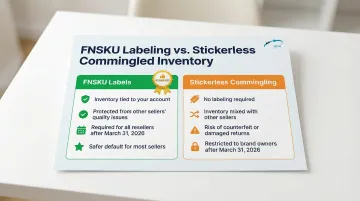
- Resellers must use FNSKU labels starting March 31, 2026 (no more stickerless commingling)
Types of Amazon FBA Labels You Need to Know
FNSKU (Fulfillment Network Stock Keeping Unit) Labels
The FNSKU is Amazon's seller-specific barcode that starts with "X" and ties inventory to your exact account and listing. Unlike universal UPC or EAN codes, FNSKUs prevent your products from being commingled with identical items from other sellers. That separation protects you from quality issues caused by counterfeit or damaged stock that belongs to someone else.
Every unit sent to FBA must display a scannable FNSKU label unless you qualify for the stickerless commingled inventory option (covered below). Each label includes the barcode, the product title, and the item condition (new, used, etc.).
Shipment-Level Labels
Beyond unit labels, Amazon requires specific labels for the shipment itself:
- FBA Box ID Label: Printed from your shipping queue in Seller Central; every carton needs a unique box ID
- Pallet Labels (LTL/FTL shipments): Four FBA Pallet ID labels on the top center of each pallet side, placed outside the stretch wrap
These labels route your shipment to the correct fulfillment center and help Amazon track boxes through receiving.
Product-Category-Dependent Labels
On top of shipment routing, certain products require additional safety or handling labels based on their category:
- Suffocation warning labels: Poly bags with openings 5 inches or larger (measured flat) must display this warning
- Fragile/This-Side-Up labels: Items requiring careful orientation or special handling need these applied
- Expiration date labels: Perishable or time-sensitive products must show a clear expiration date on the label
Failure to include these labels results in re-prep fees or rejected inventory.
Amazon FBA Label Requirements
Official FNSKU Label Specifications
Amazon enforces strict technical requirements to ensure barcode scannability:
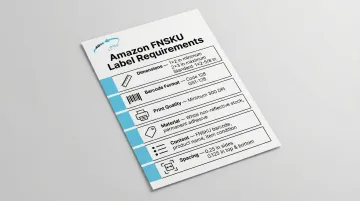
- Dimensions: Labels must be between 1 × 2 inches and 2 × 3 inches (the standard is 1 × 2-5/8 inches, compatible with Avery 5160 sheets)
- Barcode format: Code 128 (GS1-128) symbology
- Print quality: Minimum 300 DPI resolution
- Material: White, non-reflective stock with permanent adhesive
- Content: FNSKU barcode, human-readable text below the barcode, product name, and item condition
- Spacing: 0.25 inch of white space on sides, 0.125 inch on top and bottom
Labels must be printed in solid black ink on white background—no colors, no fading, no smudging.
Label Placement Rules
Placement errors trigger the same compliance failures as poor print quality:
- Flat surface only: Place labels on flat areas, never on curves, corners, or seams
- Cover existing barcodes: Any UPC, EAN, or ISBN on the product packaging must be completely covered or made unscannable
- One scannable barcode: Only one barcode should face outward per unit
- Avoid problem areas: Don't place labels over vents, perforations, or areas prone to wrinkling
If Amazon's scanners detect multiple barcodes or can't read your FNSKU, your shipment will be flagged for correction fees.
January 2026 Policy Change: Self-Labeling is Now Mandatory
Amazon has announced the discontinuation of all FBA prep and labeling services in the U.S. effective January 1, 2026. Shipments created after this date must arrive fully prepped and labeled. Non-compliant units will be marked as defects and are not eligible for reimbursement if damaged or lost.
This change means sellers must now:
- Print and apply all FNSKU labels themselves
- Work with a third-party prep service if you're not labeling in-house
- Ensure every unit is labeled correctly before shipping
- Note: shipments created before January 1, 2026 can still use Amazon's labeling service, even if they arrive after the cutoff date
Stickerless Commingled Inventory Option
Amazon offers a stickerless option for eligible products, allowing you to use existing UPC/EAN barcodes instead of FNSKUs. However, starting March 31, 2026, this option is restricted:
- Brand owners enrolled in Amazon Brand Registry can continue using manufacturer barcodes
- Resellers must use FNSKU labels for all products, even those with manufacturer barcodes
Trade-offs of commingling:
- No labeling required
- Your inventory is mixed with other sellers' units, exposing you to quality issues from counterfeit or damaged stock from other accounts
A single commingled unit returned by another seller in poor condition can trigger negative feedback on your account—making FNSKU labeling the safer default for most sellers.
Amazon FBA Label Printing Options
Option 1: Print via Seller Central
Generate labels directly from your Amazon Seller Central account:
- Navigate to Manage Inventory
- Select the products requiring labels
- Choose Print item labels from the "Action on selected" dropdown
- Download the PDF file (supports 30 labels per page on US Letter or 24 per page on A4)
This method is free—you only pay for label stock and printing supplies.
Option 2: Third-Party Label Printing Services
High-volume sellers often order pre-printed labels from barcode and label vendors. Typical pricing ranges from $0.015 to $0.02 per label (roughly $15–$20 per 1,000 labels).
When this makes sense:
- You ship 500+ units per week
- You outsource prep to a third-party center
- You want to eliminate in-house printing labor
Option 3: Amazon's FBA Label Service (Ending January 1, 2026)
Until the January 2026 cutoff, Amazon offers to print and apply labels for $0.55 per unit. This service is available only for products with scannable manufacturer barcodes and is subject to eligibility restrictions.
After January 1, 2026, this option disappears, so building a reliable self-labeling workflow now is worth prioritizing.
Printer Hardware for Self-Printing
Thermal direct printers are the industry standard for FBA labels. Without ink or toner, they print clean, scan-ready barcodes at speeds that keep pace with high-volume operations.
Recommended models:
- Brother QL-1110NWB: Supports labels up to 4 inches wide, 300 DPI resolution, Bluetooth/Ethernet/Wireless connectivity
- Zebra ZD421: Direct thermal printer, 300 DPI, widely used in fulfillment centers
Avoid inkjet printers—they smear, fade, and produce inconsistent bar spacing that causes scan failures.
Label Stock Considerations
For sellers sourcing label stock, Alliance Packaging Group stocks both direct thermal and thermal transfer label options with permanent adhesive, compatible with Zebra, Datamax, and Sato printers—suited for high-volume FBA operations.
When selecting stock, these specs determine scan reliability:
- Permanent adhesive (not removable)
- Direct thermal or thermal transfer compatibility (match your printer type)
- Correct dimensions (1 × 2-5/8 inches is standard)
- White, non-reflective stock
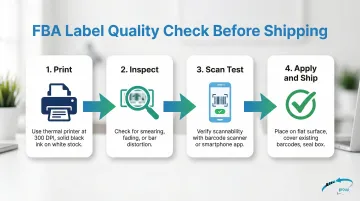
Before printing a full batch, test one label's scannability with a barcode scanner or smartphone app.
Tips for Printing and Applying Amazon FBA Labels Correctly
Printer Setup and Calibration
Before printing your first batch:
- Calibrate printer to exact label size (most printers have a calibration function in settings)
- Set print density to produce solid black bars without bleed or fading
- Run a test print and scan the barcode with your smartphone—if it doesn't scan instantly, adjust density and retest
Label Placement Best Practices
Apply labels to flat, clean, dry surfaces:
- Cover existing barcodes completely—no bleed-through allowed
- Avoid curved surfaces—labels on bottles or tubes must go on flat panels
- Don't place over text—especially on clear packaging where text shows through
- Press firmly—ensure full adhesion with no air bubbles or lifted edges
Batch Labeling Efficiency
For high-volume operations:
- Pre-print all labels before labeling sessions
- Use a label dispenser tool to speed application
- Create a labeling checklist—verify every unit is labeled before boxing
Verify Scannability Before Shipping
Test printed labels with a barcode scanner or smartphone scanning app before sealing boxes. A label that looks correct may still fail if:
- Print density is too light
- Barcode is distorted or stretched
- Label stock is reflective or transparent
Catching these issues before shipment avoids receiving rejections at Amazon's fulfillment centers—rejections that delay inventory availability and can trigger non-compliance fees.
Common Amazon FBA Labeling Mistakes to Avoid
Printing at Too Low a Resolution or Using Inkjet Printers
Many new sellers print FNSKU labels on inkjet printers, which produce inconsistent bar spacing, smearing, and fading. This is a leading cause of receiving errors.
The fix: Switch to a thermal printer. The upfront cost ($150–$300) pays for itself in avoided fees and faster receiving.
Applying Labels Over Surfaces Where Old Barcodes Show Through
Placing an FNSKU label over a UPC without fully obscuring it means Amazon's scanners may read the wrong barcode. This causes:
- Wrong item received in system
- Inventory confusion and stranded units
- Potential return or disposal fees
Use opaque labels or fully black out existing barcodes with a marker before applying your FNSKU label.
Skipping Labels on Bundled or Multi-Unit Packs
Sellers who create multi-packs must label the bundle as a single unit with a new FNSKU. Leaving individual item barcodes exposed is a compliance error that causes receiving problems.
Cover all individual barcodes on the bundle packaging and apply a single FNSKU label to the outer unit — not to any one item inside.
Conclusion
Amazon FBA label compliance directly protects your inventory, ensures units are received correctly, and prevents costly delays, rejections, and fees. With Amazon ending its labeling service in January 2026, establishing a consistent labeling process is now a core operational requirement.
Invest in the right printer, source quality label stock, follow placement rules, and test scannability before every shipment. Sellers who treat these steps as routine — not reactive — ship faster, face fewer rejections, and keep fulfillment running smoothly. Alliance Packaging Group stocks a full range of label materials suited for FBA workflows, available for immediate nationwide shipment.
Frequently Asked Questions
How much do Amazon barcodes cost?
FNSKU labels are free to generate through Seller Central—you only pay for printing supplies. UPC/GTINs purchased through GS1 carry a registration fee: $30 for a single GTIN (no renewal fee), $250 initial + $50 annual renewal for 10 GTINs.
How much does Amazon charge for labeling?
Amazon's FBA Label Service charges $0.55 per unit for eligible products. This service ends January 1, 2026, after which sellers must print and apply all labels themselves or use third-party prep services.
How to get a barcode for Amazon products?
Start by obtaining a GTIN (UPC/EAN) through GS1—this is required to create your listing. Amazon then assigns an FNSKU, which you generate and print directly from Seller Central. The GTIN identifies the product globally; the FNSKU ties it to your seller account.
Do I need a barcode to sell my product on Amazon?
Yes. Amazon requires a product identifier—UPC, EAN, or a GTIN exemption for private label and handmade items—to create a listing. Every FBA unit must have a scannable label: either the manufacturer barcode (if stickerless-eligible) or an FNSKU label.
What is the best barcode for Amazon?
The FNSKU barcode (Code 128 format) is the required label for FBA units. It ties inventory directly to your seller account and listing, keeping it separate from other sellers' stock. UPC/EAN barcodes are only acceptable under the stickerless commingled inventory option, which is restricted to brand owners starting March 31, 2026.